Request Flow
The Uploader service supports two main modes for asset delivery: Push Mode and Pull Mode. These modes determine how Phraseanet is notified and how it retrieves uploaded assets.
Push Mode
When an asset is uploaded, the Uploader service immediately notifies Phraseanet that a new asset is available. Phraseanet then downloads the media from the Uploader service.
Sequence Diagram (Push Mode)
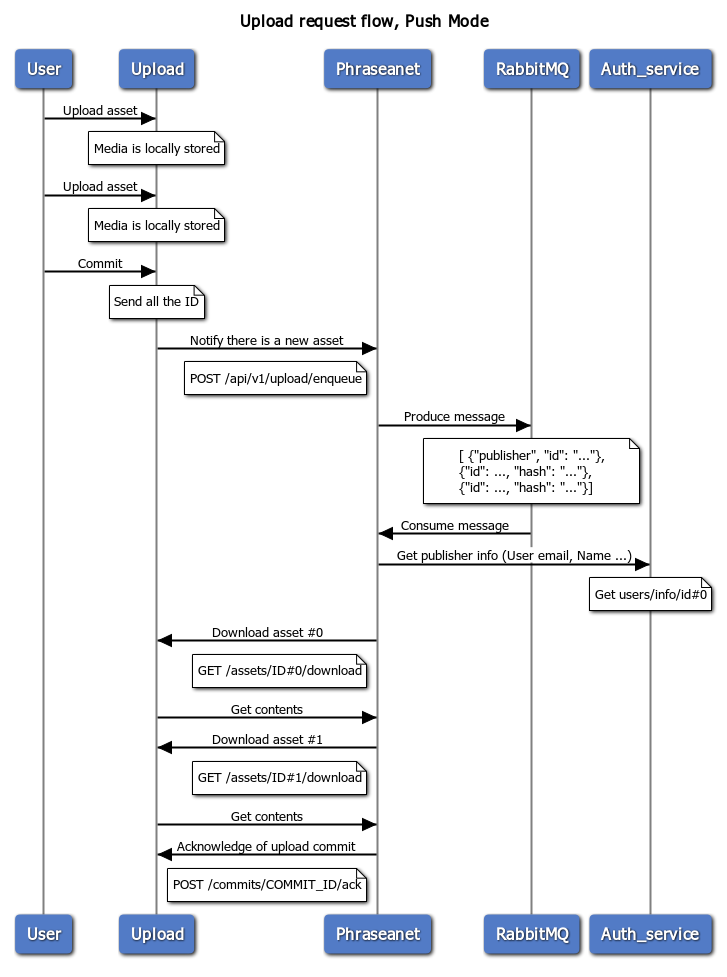
title Upload request flow, Push Mode

User->Upload: Upload asset
note over Upload: Media is locally stored
User->Upload: Upload asset
note over Upload: Media is locally stored
User->Upload: Commit
note over Upload: Send all the ID
Upload->Phraseanet: Notify there is a new asset
note left of Phraseanet: POST /api/v1/upload/enqueue
Phraseanet->RabbitMQ: Produce message
note over RabbitMQ
    [ {"publisher", "id": "..."},
    {"id": ..., "hash": "..."},
    {"id": ..., "hash": "..."}]
end note
RabbitMQ->Phraseanet: Consume message
Phraseanet->Auth_service: Get publisher info (User email, Name ...)
note over Auth_service: Get users/info/id#0

Phraseanet->Upload: Download asset #0
note left of Phraseanet: GET /assets/ID#0/download
Upload->Phraseanet: Get contents
Phraseanet->Upload: Download asset #1
note left of Phraseanet: GET /assets/ID#1/download
Upload->Phraseanet: Get contents
Phraseanet->Upload: Acknowledge of upload commit
note left of Phraseanet: POST /commits/COMMIT_ID/ack
Pull Mode
In Pull Mode, the Uploader service does not notify Phraseanet immediately. Instead, Phraseanet periodically fetches new commits and downloads the assets.
Sequence Diagram (Pull Mode)
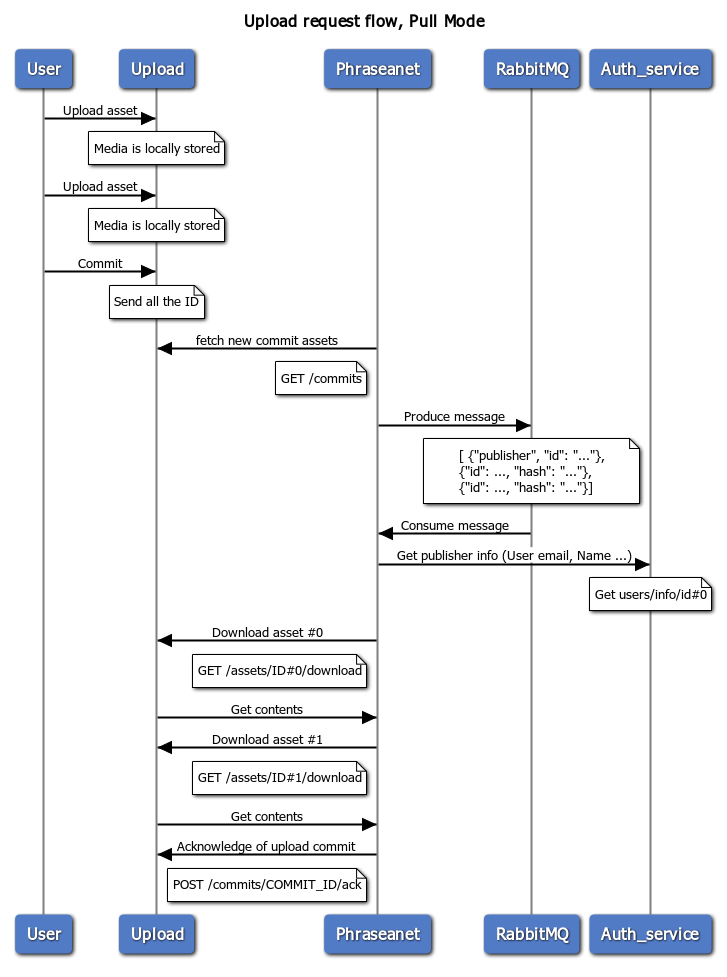
title Upload request flow, Pull Mode

User->Upload: Upload asset
note over Upload: Media is locally stored
User->Upload: Upload asset
note over Upload: Media is locally stored
User->Upload: Commit
note over Upload: Send all the ID
Phraseanet->Upload: fetch new commit assets
note left of Phraseanet: GET /commits
Phraseanet->RabbitMQ: Produce message
note over RabbitMQ
    [ {"publisher", "id": "..."},
    {"id": ..., "hash": "..."},
    {"id": ..., "hash": "..."}]
end note
RabbitMQ->Phraseanet: Consume message
Phraseanet->Auth_service: Get publisher info (User email, Name ...)
note over Auth_service: Get users/info/id#0

Phraseanet->Upload: Download asset #0
note left of Phraseanet: GET /assets/ID#0/download
Upload->Phraseanet: Get contents
Phraseanet->Upload: Download asset #1
note left of Phraseanet: GET /assets/ID#1/download
Upload->Phraseanet: Get contents
Phraseanet->Upload: Acknowledge of upload commit
note left of Phraseanet: POST /commits/COMMIT_ID/ack
For more on the uploader setup and configuration, see Uploader Setup and Uploader Configuration.