Status: Work In Progress
This documentation page is currently being drafted and may be updated frequently.
Uploader Client and Administrator
Glossary
- Target: Destination for files
- Form-editor: Set of widgets available via the liform library, allowing the creation of an indexing form accessible to the user.
- Target Parameter Editor: Additional indexing data, not accessible to the user.
- Asset: Uploaded file.
- Commit: Grouping of assets and information entered in the target form (in JSON format)
- Multipart upload: Files are split into chunks and reassembled on the server once the upload is complete.
Basic Concepts
-
The Phrasea Uploader service consists of an API, a user interface called “Uploader client,” and a “worker.” These three components rely on a file system, a database, cache servers, and a message bus. The components can be scaled as needed.
-
The Uploader contains Targets.
-
Each Target is associated with a form, made up of various widgets.
- The form allows the user uploading files to enter information related to the batch of files sent.
- The form definition is done in an online editor.
-
File uploads via a Target are subject to group rights.
-
A destination can be defined for each Target.
- A Target can be:
- A Phrasea collection
- A Phraseanet collection
- A third-party application
- A Target can be:
-
By default, the account database is that of the “Phrasea” realm in Keycloak.
- The Uploader service uses an OAuth client in Keycloak for authentication.
File Upload Workflow with the Uploader Client Interface
This section describes the main steps and actions triggered when adding files with the Uploader client to Databox.
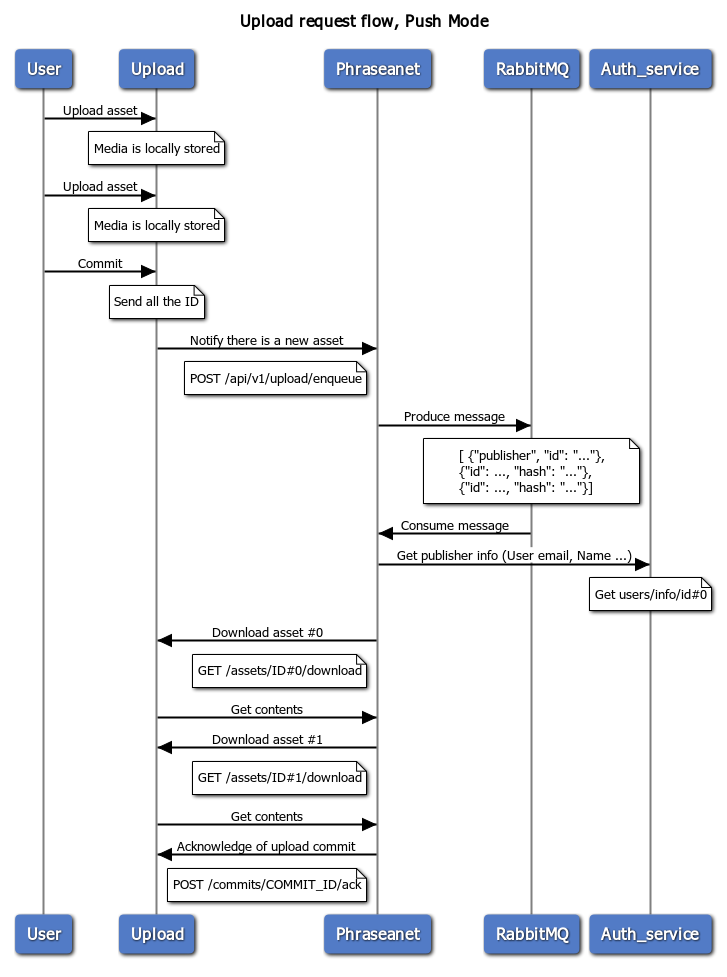
Interaction between Uploader and Phrasea Databox
-
A user authenticates.
-
Targets are presented to them, according to their group membership.
-
The user selects a Target.
-
The user selects files via:
- File selector
- Drag and drop
- Paste from clipboard (images only)
- Entering a file URL
-
The user proceeds to the next screen to complete the form.
-
-
File upload starts in the background.
- The user completes and validates the form.
-
Once all files are received by the Uploader service, the destination defined in the Target is notified that a batch of files is available:
- Phrasea Databox
- Phraseanet
- Third-party application able to declare an endpoint listening for emitted notifications
-
The Databox worker starts creating an asset for each file in the batch and downloads the file from the Uploader storage configured in the stack.
-
The information from the form is used to populate the attributes of the batch of files sent.
-
- The user completes and validates the form.
Supported file systems by the Uploader service and minimum requirements
The Uploader is compatible with S3 storage. For optimal operation, the file system must support certain features (see the corresponding documentation).
Tested and validated systems are AWS S3 and Minio (see the stack documentation, pay attention to containers used as primary datastore).
For optimal use, the Uploader supports:
- Multipart upload, allowing large files to be transmitted
- Technical capabilities, such as maximum accepted size, depend on the file system used
Configuration
Uploader and Phrasea Databox
Configuring a Target for Phrasea
Databox Configuration
In the Databox client application, on a workspace:
![][image1]
Define a new “Uploader” integration:
- The integration is specific to the workspace and must be defined for each one.
Uploader Admin Configuration
Configuration on the Uploader side is done via the admin interface:
- Add a Target in upload > target
![][image2]
- Parameters to enter, obtained when creating the “Uploader” Databox integration:
- “Target URL”: the endpoint on the “Phrasea” side where file additions will be notified
- Authorization key: authentication key generated when creating the integration
- Authorization Scheme: description of the authentication mechanism to use for Uploader > Databox exchanges
![][image3]
# Base URL of the Uploader API
baseUrl:
# Target collection ID (optional)
collectionId:         ~
# Security key to authenticate Uploader requests
securityKey:
Uploader and Phraseanet
Target configuration.
In Push mode, the operation of the Uploader with Phraseanet is identical in mechanics; only a few parameters change.
Target Form Configuration
Form-editor
In the Uploader client interface or from Uploader admin/form-editor
Documentation and example form
Click on a Target.
The form editor allows you to describe the form in JSON and see the instant rendering.
Example:
![][image4] todo
Target Parameter Editor
The “Target Parameter Editor” allows you to pass additional parameters included in a section of the JSON to describe the asset.
Parameters defined in the “Target Parameter Editor” take precedence over information entered in the form-editor. Therefore, it is unnecessary to declare attribute values in the form if they are already referenced in the Target parameters.
![][image5] todo
Possible Notifications
It is possible to notify the sender via Uploader. Like other modules, the “Uploader” module integrates Novu for notification management.
FAQ
Why an external service?
- This isolates file addition in a dedicated interface
- Without giving access to the entire DAM
- An interface reduced to the essentials for users
- Can work in “Pull” mode: the consuming application queries the Uploader from a secure area at its chosen frequency (the “Pull” mode is not yet available for Phrasea)
Why Form-editor and Target-editor?
- The Form-editor allows you to build a form usable by the user
- The Target Parameter Editor allows you to add values to the batch of assets without going through the form; these values are not accessible to the user uploading the assets